Demo ·
Bind the controller project, then read the playbook
IDE agents can bind the AAP project that is the git remote, then read stored draft YAML and/or SCM YAML.
Sprint 129 ships put_aap_project_id and get_playbook
- MCP
- AAP
What you are seeing
IDE agents could already list projects (get_aap_projects) and see the current id (get_effective_settings). They could not set the id. A later session also could not inspect the server draft that 128 kept visible in the web UI, or the SCM file.
Sprint 129 ships that missing pair:
put_aap_project_id— bind the project that is the git remoteget_playbook— read stored draft YAML and/or SCM YAML
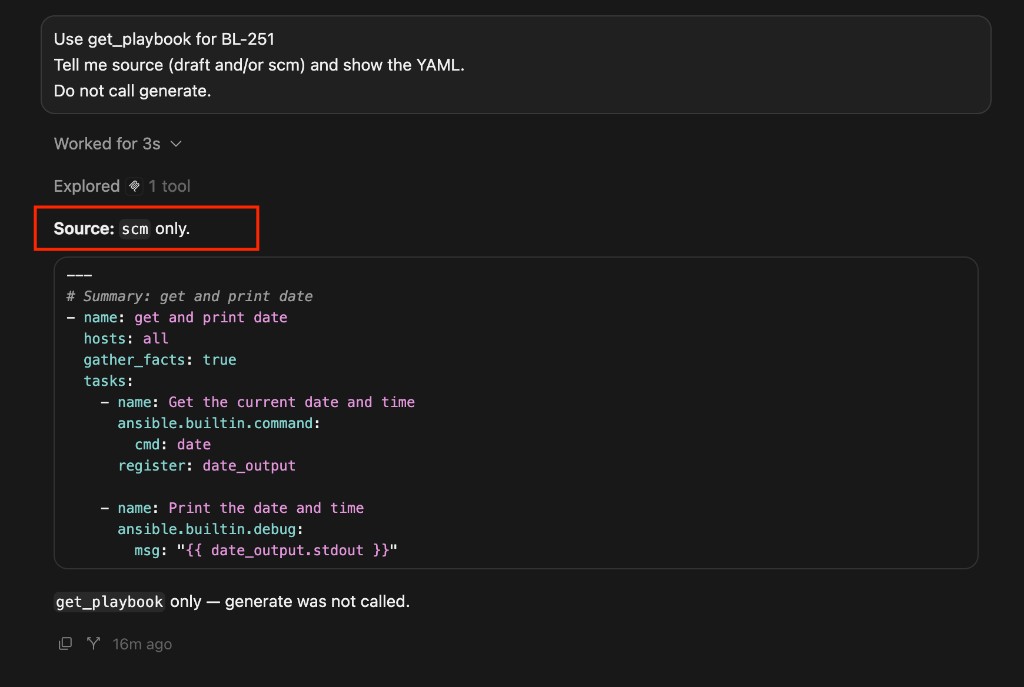
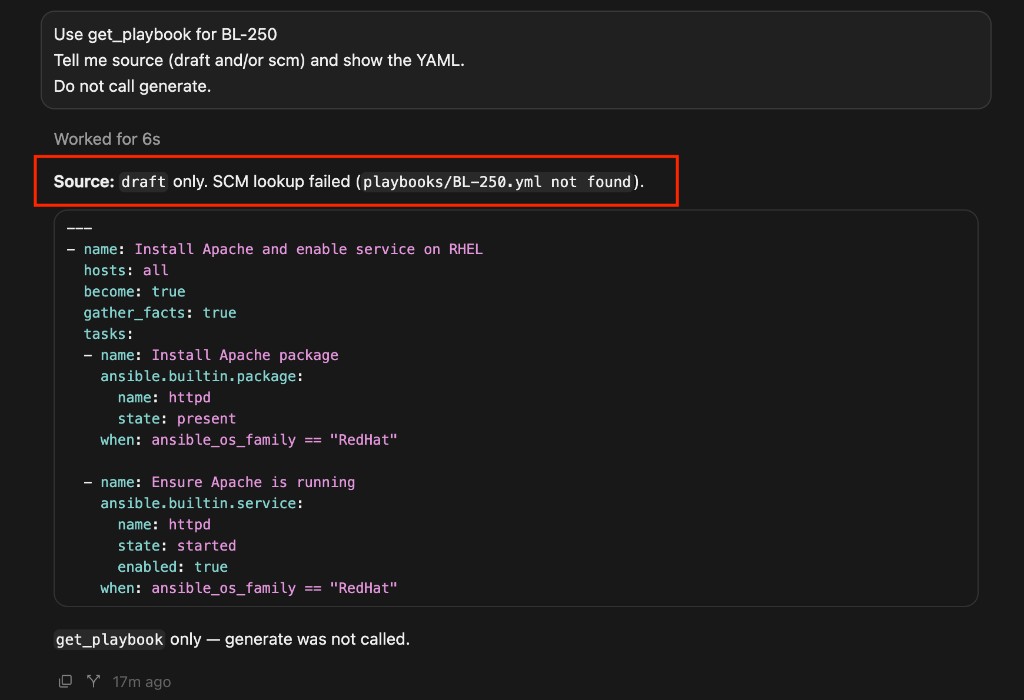
get_playbook names its source. When the file is already in the Controller project, you get scm only (screenshot above). When the SCM path is missing, the stored draft still returns. Source is draft only, plus the lookup failure — still no generate:
What moved
| Before (128 / 120) | After (129) |
|---|---|
get_aap_projects / get_effective_settings (read the id) | put_aap_project_id writes only that field |
| Check / save / get fail closed without a selected project | Agent can select a listed project from MCP |
| Draft and SCM GET routes — web UI and HTTP only | get_playbook on HTTP /mcp/ and stdio |
| Generate returns YAML now; later session cannot inspect | Draft and/or SCM with explicit source |
| Git construct failure hides the draft on MCP | Same 128 degrade: draft + git_error; no generate |
| Skill assumes a project is already bound | ide_ticket_to_playbook: list → set if unset → read → check / JT |
The agent surface
See the gap
Use get_effective_settings.
Tell me aap_project_id. Do not print tokens.
If the id is unset, use get_aap_projects and show id, name, scm_url.
Bind a listed project
Use put_aap_project_id with aap_project_id from that list.
Give me id, name, and scm_url.
If the id is unknown or <= 0, show the candidates. Do not write tokens.
Read YAML without generating
Use get_playbook for <TASK_KEY>.
Tell me source (draft and/or scm) and the YAML.
If git cannot build, still return the draft when present, plus git_error.
Do not call generate.
Bind, then read, then check
Follow ide_ticket_to_playbook for <TASK_KEY>.
If aap_project_id is unset, list projects and set one.
If you did not just generate, use get_playbook before refine/validate.
Then check / JT. Do not launch. Do not cancel. Do not mutate Crane.
Default Skill still does not compose post_aap_launch, post_aap_cancel, post_aap_relaunch, or Crane mutations. Recover stays on ide_job_recover.
Same capability ids on HTTP /mcp/ and stdio. After you take the appliance update, fully restart the IDE MCP process so put_aap_project_id and get_playbook appear.
PAT and transport: MCP quickstart (Configuration → MCP Connect).
Why it matters
- For IDE agents: select the git remote and inspect stored YAML without opening the web UI.
- For operators: check / save / get can succeed after 128 fail-closed, because the project id is set.
- For the product: see the ticket (113) + browse binds (120) + bind the remote and read the YAML (129) + check → JT. An IDE-only session is no longer blocked on a Settings click.
Try it (about five minutes)
Goal: bind a listed project, read draft and/or SCM YAML, continue to check / JT without launching.
0. Prerequisites
- Appliance running with AAP (or lab Controller) configured.
- PAT from Configuration → MCP Connect (or HTTP
/mcp/with Bearer). - User Settings: git PAT. Do not paste tokens into chat.
- A Controller project with a non-empty
scm_url, and a task that has a server draft and/or SCM file. - Reload stdio or Cursor after the update so
put_aap_project_idandget_playbookappear.
1. See whether a project is bound
Use get_effective_settings.
If aap_project_id is unset, use get_aap_projects.
2. Bind (new)
Use put_aap_project_id with a listed id.
Confirm name + scm_url. Confirm tokens were not accepted or returned.
3. Read (new)
Use get_playbook for <TASK_KEY>.
Confirm source draft and/or scm.
If AAP is down, confirm draft + git_error and that generate was not called.
4. Continue the happy path
Use get_check_playbook then post_aap_job_template for <TASK_KEY>.
Do not launch unless I explicitly confirm.
5. Optional Skill
Follow ide_ticket_to_playbook for <TASK_KEY>.
Bind the project if unset. Read YAML if you did not just generate.
Do not launch. Do not cancel. Do not apply Crane.
Available to customers
Included in v2026.9.0. After you take the appliance update, fully restart the IDE MCP process so put_aap_project_id and get_playbook appear.
Subscribe for updates
Get an email whenever we publish new guides and blog posts. Unsubscribe anytime.
By subscribing you agree we may email you about Velocity and related Level Up Labs updates. We store your address in the same lead sheet as our contact form.