Crane
Crane
Your Automation Platform, as code.
Beta · Configuration-as-Code Export/Import for Ansible Automation Platform
Crane captures a Red Hat Ansible Automation Platform deployment as a Git-native Configuration-as-Code (CaC) repository, making it versioned, reviewable, and ready to recreate or sync on AAP 2.6+.
What it is
Crane is the latest example of what we mean when we say that BacklogZero® adds unique value for Red Hat Ansible customers on Day 1 and Day 1,000. BacklogZero generates Ansible playbooks and creates AAP job templates; Crane captures AAP configurations and keeps backing Git repos in sync.
Your organization's Ansible playbooks and roles already live in Git. The platform that launches them (organizations, credentials, projects, inventories, job templates, and related Controller objects configured in the UI) often does not. That's because the config usually grows in the Controller over time via click-ops and is not version-controlled by default.
Crane is a deterministic CaC compiler developed by Level Up Labs. It is not a backup/restore utility or an AI-authored YAML repo. It connects to an AAP Controller, exports configurations (with secrets never leaving the source controller), packages a Red Hat-aligned "apply repo," and pushes that repo to a remote Git host you choose.
Use Crane when you need disaster recovery, environment promotion, audits, or upgrades without treating the UI as the source of truth.
Sources and targets
Crane now supports several automation platform sources and targets, including:
| Export from | Apply to | What Crane does |
|---|---|---|
| AAP 2.4 | AAP 2.7 | 2.4→2.7 rename |
| AAP 2.6+ | AAP 2.6+ | Same-platform apply |
| AWX | AAP 2.7 | Export from AWX; apply onto AAP 2.7 |
If you omit a target, apply is still AAP 2.6.
Export/import in action
AWX → AAP 2.7
Export Configuration-as-Code from AWX and apply onto AAP 2.7.
AAP 2.4 → AAP 2.7
Export from AAP 2.4 and apply onto AAP 2.7.
Import UX is still taking shape
Because the default nature of Configuration-as-Code is ansible-playbook and ansible-navigator-driven, we are evaluating the best native import experience we can provide for BacklogZero customers. That path is likely to feature the BacklogZero MCP. We are waiting on more early feedback from Crane beta users before we lock it in.
Auto-Sync
Store Configuration-as-Code in git automatically
Crane's Auto-Sync feature binds a Configuration-as-Code repository, then refreshes it whenever you run a BacklogZero-generated sync job template on Ansible Automation Platform.
Exporting AAP configuration by hand is an anti-pattern, and "automating the automation" is always the goal. Crane Auto-Sync closes that loop. Bind a Git repo once. BacklogZero creates a Controller job template that can run on a schedule. Launch it (or schedule it the way you already schedule jobs) and Crane compiles live Controller state into CaC and delivers it to the bound remote. You review the commit. Controller stays the system you operate; Git stays the source of truth.
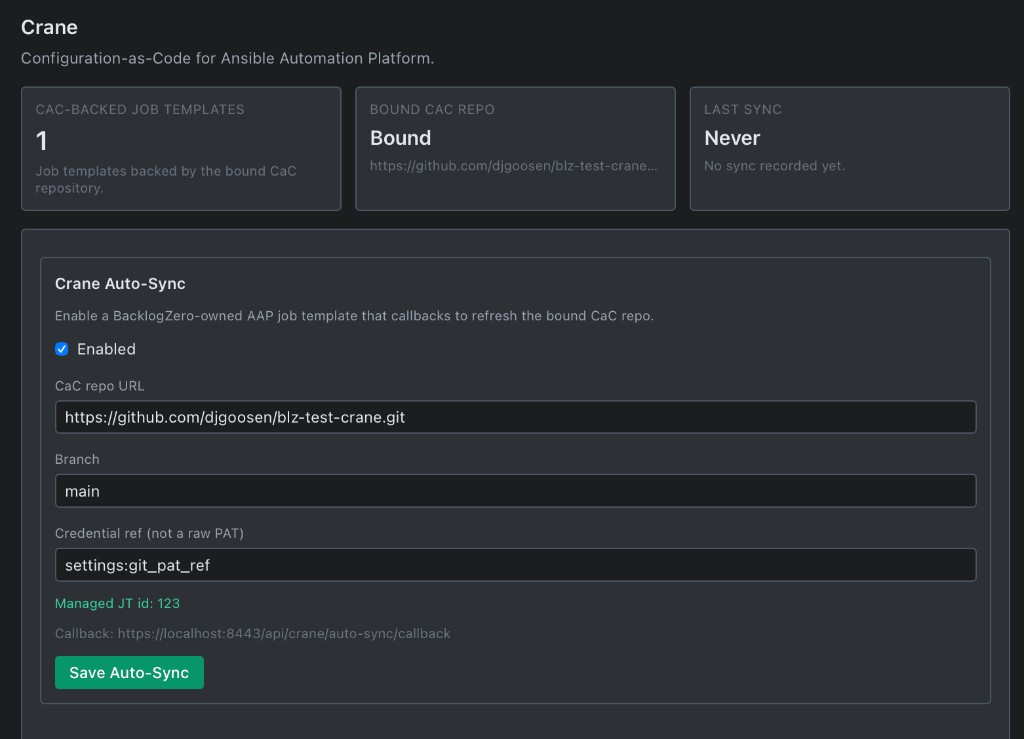
Auto-Sync: a BacklogZero Crane feature that keeps your CaC repo current.
Trigger from AAP
Sync is a job template you already know how to run, schedule, and audit.
One bound repo
Enable Auto-Sync, point at the CaC remote, and Crane owns export → package → Git.
Your perimeter
Callbacks stay on the appliance you host. Credentials are refs, not raw tokens in the UI. Disable Auto-Sync and the managed template is retired.
Beta Status
Crane (Beta) is currently available in custom FDE engagements.
Honest limits in Beta
No unattended GitOps drift loop, no one-click apply from the UI, no job-history export, no credential secret export, no project/repo migration.
Auto-Sync and Best Practices assess are available; fleet reconciliation and full promotion workflows are later.